

爱笔思画X
图形与设计/娱乐
44.57 MB
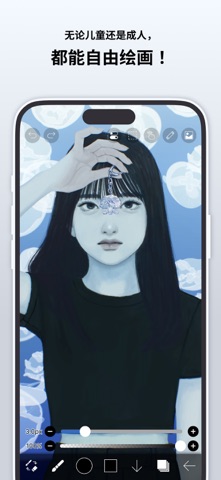




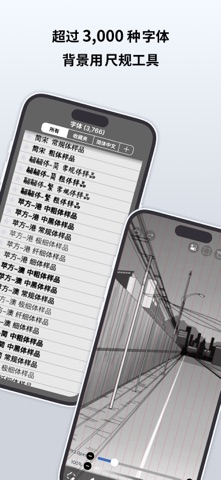
iPhone、iPad、iPod touch
献给全世界渴望轻松享受绘画与动画创作的你。 ibisPaint X 是一款系列累计下载量突破 5 亿次、可在智能手机和平板电脑上使用的专业插画・动画制作应用。 "画画好像很难"——这款应用正是为有这种想法的你而生。即使是免费版,也能获得毫不妥协的创作体验;操作简单明了,无需摸索即可上手;而且越用越顺手,令人安心。ibisPaint X 始终是每个人都能轻松开始"画画"的入口,同时不断拓展创作的可能性——从一张插画到逐帧动画,再到配有背景音乐和音效的视频。 搭载 13 万种以上画笔、30,000 件以上素材、3,000 种以上字体、86 种图像处理滤镜、46 种网点纸、27 种图层混合模式,以及矢量工具、参照窗口、放射线尺・对称尺、动态滤镜、AI 学习干扰功能等,专业程度不输电脑绘图软件。不仅可以画插画,还能进一步制作动画,甚至将创作过程录制为延时视频并加以分享,一站式尽享创作乐趣。无论年龄、国籍、经验如何,都深受全世界用户的喜爱。 *绘画教程 YouTube 频道 我们发布了大量关于如何善用爱笔思画的视频,欢迎订阅! https://youtube.com/ibisPaint *支持的触控笔 https://ibispaint.com/stylus/supported_digital_stylus.jsp?platformType=1 *购买方案说明 https://ibispaint.com/lecture/index.jsp?no=26 ※如未在免费试用结束前至少 24 小时取消自动续订,将在续订时自动扣费。 【关于应用访问权限】 本应用可能会基于提供服务及提升易用性的目的,访问设备的各项功能。使用本应用并非必须开启任何访问权限,以下权限均为可选权限。用户可以不同意这些可选权限。即使拒绝授权,本应用的基本功能仍可继续使用,但需要相应权限的部分功能可能会受到限制。 •照片图库中的图片・视频 用于导入作品文件和图片,以及保存所制作的作品文件、图片和视频 •麦克风语音输入 用于与触控笔等受支持的外部设备进行连接和通信 •蓝牙通信 用于与触控笔等受支持的外部设备进行连接和通信 •推送通知的发送 用于推送作品相关通知、应用更新信息及重要公告 *问题咨询与故障反馈 我们无法回复评论区中的咨询或故障反馈,敬请通过以下支持窗口联系我们。 https://ssl.ibis.ne.jp/en/support/Entry?svid=25 *ibisPaint 服务使用条款 https://ibispaint.com/agreement.jsp
What's New
Thank you for using ibisPaint X! The summary of this update is as follows. [Improvements, Changes] - Made copying shapes and layers faster, and when there is no Selection Area, only the drawn area is now copied to the clipboard. - Added a checkmark button to close some settings windows that previously could only be closed by tapping outside the window. - When you undo or redo the conversion of an animation artwork to Video Mode, some windows are now closed. - Changed how account information is displayed and how you log in from the Settings window. Also, signing up with an external service account has been discontinued, so you now need to create an ibisAccount when logging in for the first time. - When cloud sync is complete, the top of My Gallery now shows the number of synced artworks out of the total. This lets you check whether any artworks remain unsynced due to an issue such as a damaged file. [Fixed Bugs and Problems] - Fixed an issue where the canvas could not be moved, zoomed, or rotated with keyboard shortcuts or the mouse wheel while editing a 3D Layer. - Fixed an issue where the app could crash when playing back an artwork drawn by switching between a finger and a stylus while using "After" stabilization. - Fixed an issue where a floating window could be operated while playing an animation artwork if it was placed over the Animation toolbar. - Fixed an issue where the app could freeze when importing an artwork file (IPV) under certain conditions. - Fixed an issue where the app could crash under certain conditions during playback restoration of an animation artwork. - Fixed a bug where restoring a corrupted animation artwork via playback would stop partway and never complete under certain conditions. - Fixed an issue where the app could crash when switching tools, or when opening or closing a window. - Fixed an issue where a crosshair or cursor was displayed at the pen tip or cursor position when using a stylus or mouse that does not support hover. - Fixed an issue where pose materials other than the A-pose were not shown when adding materials with the "+" button on the "List" tab of a 3D Layer. - Fixed issues on 3D Layers where controls remained displayed or were misplaced after switching objects, undoing, and similar operations. - Fixed an issue where the app could freeze when using Smart Shape after drawing a straight stroke that reverses direction partway. - Fixed an issue where the app could crash when changing the image resolution, trimming, changing the canvas size, or undoing in an artwork containing 3D Layers while the device was low on memory. - Fixed an issue where the content of the layer below showed through the opaque parts of some 3D materials. - Fixed an issue where translucent parts of a 3D material could disappear or where objects were not drawn in the correct front-to-back order. - Fixed an issue where moving a Control Point in the Background Removal filter after changing "Threshold" or "Show Mask" would show an error, make the app unresponsive, and discard the placed Control Points. - Fixed an issue where the app could crash when undoing the conversion of an animation artwork to Video Mode. - Fixed an issue where restoring an artwork could fail if an undo was performed under certain conditions. - Fixed an issue where, in some regions, the app could crash when turning on Cloud Sync from the Settings window while logged out. - Fixed an issue where a pen tablet was not recognized when connected after selecting "XPPEN Pen Tablet" or "UGEE Pen Tablet" in the "Stylus" section of the Settings window. - Fixed an issue where Quick Eyedropper or the Vector tool became extremely slow when used with an XPPEN or UGEE pen tablet. - Fixed an issue where the app would freeze when trying to save a video too large to be saved to the Photo Library. "Save Video" is no longer shown for such videos. etc. For more details, see: https://ibispaint.com/historyAndRights.jsp?newsID=313331619
爱笔思画X最新バージョン14.1.4 ipa
ipaバージョン 14.1.4 ·2026/11/02
Information
- Size
- 44.57 MB
- Language
- AR、NL、EN、FR、DE、HE、HI、ID、IT、JA、KO、PT、RU、ZH、ES、TH、ZH、TR、VI
- Provider
- ibis inc.
- Category
- 图形与设计/娱乐
- Age Rating
- 4+
- Price
- Free
- Bundle ID
- jp.ne.ibis.ibisPaintX
- Region
- CN
- Compatibility
-
iPhone
Requires iOS 15.0 or later.
iPad
Requires iPadOS 15.0 or later.
iPod touch
Requires iOS 15.0 or later.
すべてのバージョン
-
爱笔思画X - v13.1.2
2026/04/26 19:05 · 44.57 MB · Full Access Version
爱笔思画X-v13.1.2.ipa - ipaソフト源 - ipaソフト大全 -
爱笔思画X - v14.1.4
2026/11/02 21:34 · 80.78 MB · Full Access Version
爱笔思画X-v14.1.4.ipa - ipaソフト源 - ipaソフト大全 -
爱笔思画X - v14.1.3
2026/10/11 09:18 · 76.03 MB · Full Access Version
爱笔思画X-v14.1.3.ipa - ipaソフト源 - ipaソフト大全 -
爱笔思画X - v14.1.2
2026/10/05 00:53 · 76.03 MB · Full Access Version
爱笔思画X-v14.1.2.ipa - ipaソフト源 - ipaソフト大全 -
爱笔思画X - v14.1.1
2026/09/13 22:51 · 76.00 MB · Full Access Version
爱笔思画X-v14.1.1.ipa - ipaソフト源 - ipaソフト大全 -
爱笔思画X - v14.1.0
2026/09/08 15:35 · 76.00 MB · Full Access Version
爱笔思画X-v14.1.0.ipa - ipaソフト源 - ipaソフト大全 -
爱笔思画X - v14.0.9
2026/08/25 21:03 · 48.35 MB · Full Access Version
爱笔思画X-v14.0.9.ipa - ipaソフト源 - ipaソフト大全 -
爱笔思画X - v14.0.1
2026/04/26 19:17 · 47.17 MB · Full Access Version
爱笔思画X-v14.0.1.ipa - ipaソフト源 - ipaソフト大全 -
爱笔思画X - v14.0.6
2026/04/26 19:16 · 117.84 MB · Full Access Version
爱笔思画X-v14.0.6.ipa - ipaソフト源 - ipaソフト大全 -
爱笔思画X - v14.0.2
2026/04/26 19:15 · 113.88 MB · Full Access Version
爱笔思画X-v14.0.2.ipa - ipaソフト源 - ipaソフト大全 -
爱笔思画X - v14.0.0
2026/04/26 19:14 · 111.45 MB · Full Access Version
爱笔思画X-v14.0.0.ipa - ipaソフト源 - ipaソフト大全
You Might Also Like
左にスワイプして他のアプリを見る


猜图赚-趣味猜图领红包极速版&填字游戏&赚钱软件&猜图我最牛
CN · 267.07 MB · iOS 15.0+

TEGRA Zombie survival island
US · 808.23 MB · iOS 15.0+



变声器:实时游戏开黑聊天变声器&整蛊变声工具
CN · 17.64 MB · iOS 15.6+


Craft Valley - Building Game
US · 122.40 MB · iOS 15.0+

Temp Mail Pro - Multiple Email
US · 8.60 MB · iOS 16.4+

一点录屏录音-全屏高清屏幕录制视频录音转文字
CN · 19.24 MB · iOS 12.0+


Notation Pad - 五线谱钢琴谱打谱软件&作曲软件
CN · 135.82 MB · iOS 13.0+


